Home Loan Prepayment · Section 24(b) Tax · Indian Bank Rates
Own your home
7 years faster.
prepaying
prepayment
PrepayPlanner's Excel calculates your own loan numbers.
See pricing — from ₹199 ↓ · Try the free calculator ↓
In the first 7 years of a typical home loan, here's where your EMI actually goes:
Most of your early EMI pays the bank — not your home.
See exactly how much is yours vs the bank's, for your own loan ↓
Apps track your past. This plans your future.
Works on Laptop & Mobile Excel
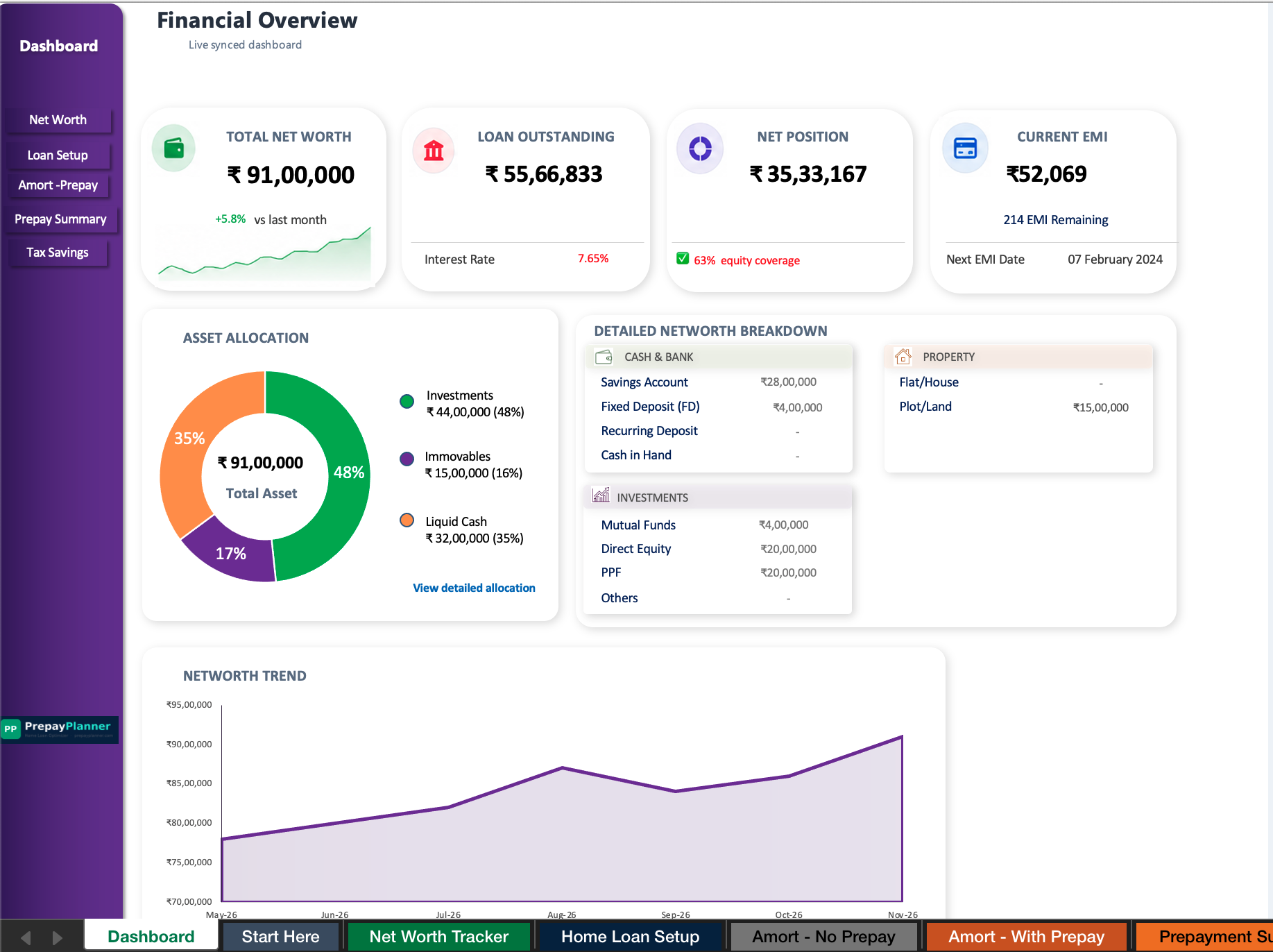
Desktop
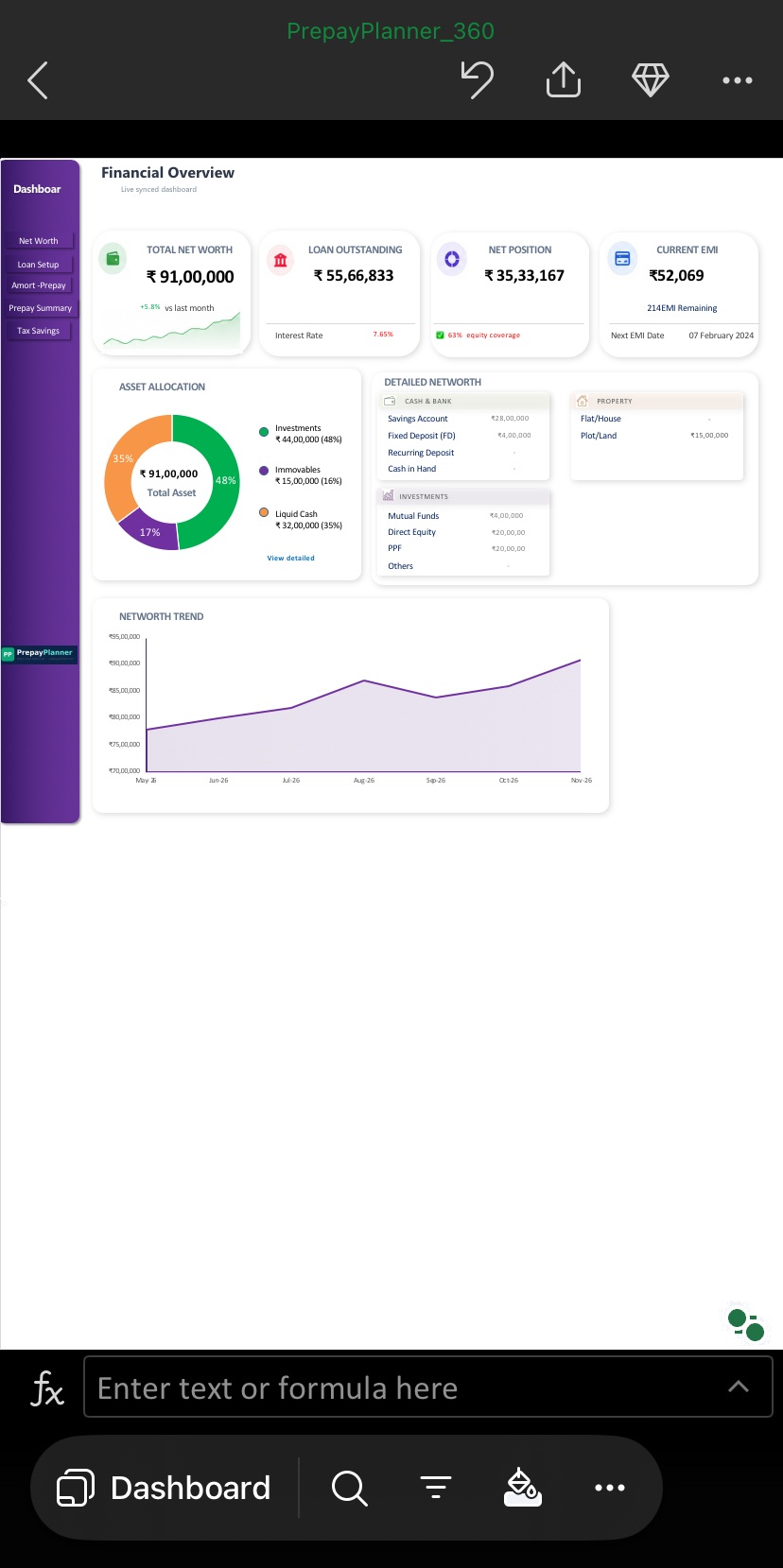
Mobile
Dashboard shown is from PrepayPlanner 360 (adds Net Worth Tracker on top of Pro's Dashboard).
"Couldn't I just build this myself in Excel?"
Sure — you could sit down with Excel formulas and work through compounding monthly interest, leap years, and India's changing tax slabs yourself.
Or you could download the exact, already-tested file below.
Pay once. Use forever.
No subscription. No account. No app. One-time purchase — instant download.
Easy 3-Step Download
1
Pay securely
UPI, card, or net banking via Razorpay
2
Instant Excel file download
Appears on this same screen right after payment
3
Open and start using it
Works instantly in Excel, desktop or mobile
- 🔒 Your numbers never leave your device
- Home Loan Setup — Indian Bank rates
- 30-year Amort — No Prepay baseline
- Amort — With Prepay + toggle
& Works on desktop & mobile Excel
⚡ Instant download after payment
- 🔒 Your numbers never leave your device
- Everything in Lite, plus:
- Dashboard — KPIs + trend charts
- Prepayment Summary + Safe Limit
- Tax Savings — 24(b) + regime toggle
- Data Backup & Import
& Works on desktop & mobile Excel
⚡ Instant download after payment
You could be losing lakhs. This costs ₹549.
- 🔒 Your numbers never leave your device
- Everything in Pro, plus:
- Net Worth Tracker — 10 years
- 120 months pre-built
- All assets vs loan — net position
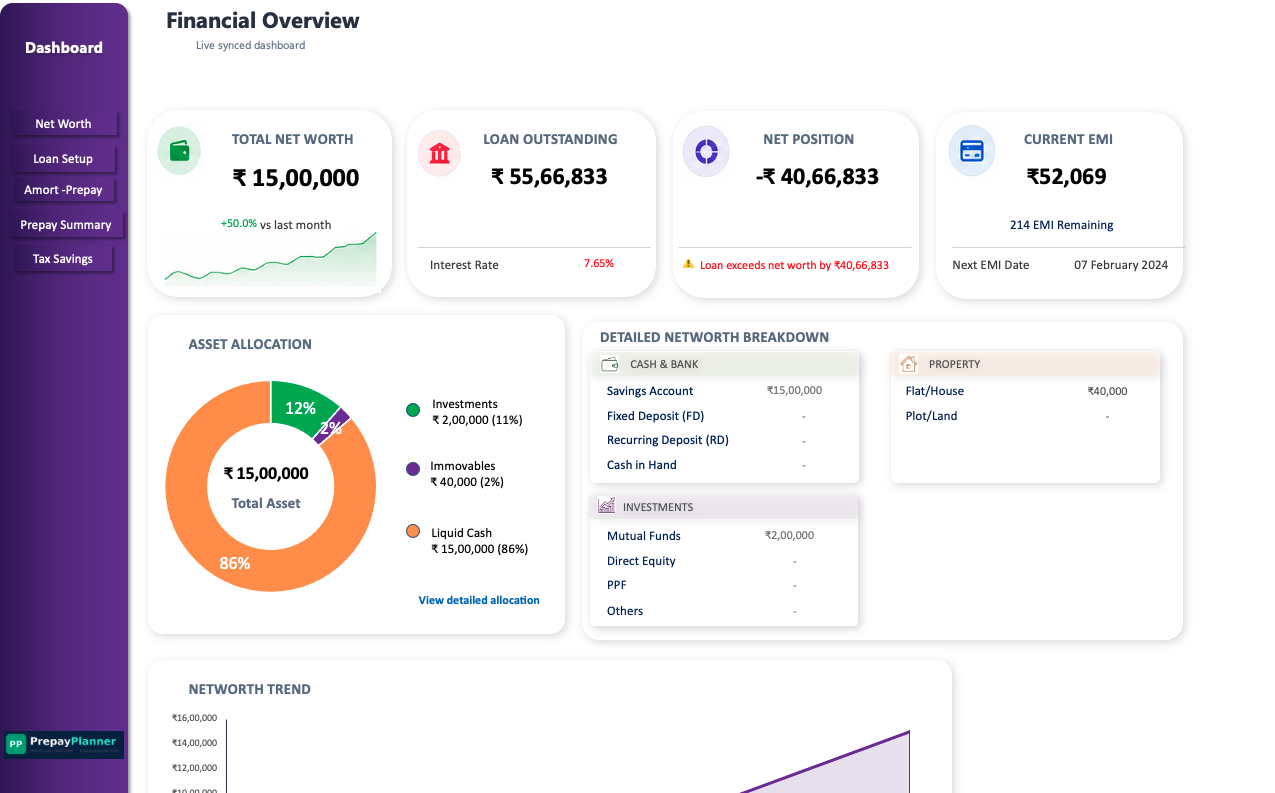
- Full Dashboard with net worth
- Liquidity-based prepay recommendation
& Works on desktop & mobile Excel
⚡ Instant download after payment
What buyers found out.
See exactly what you are getting.
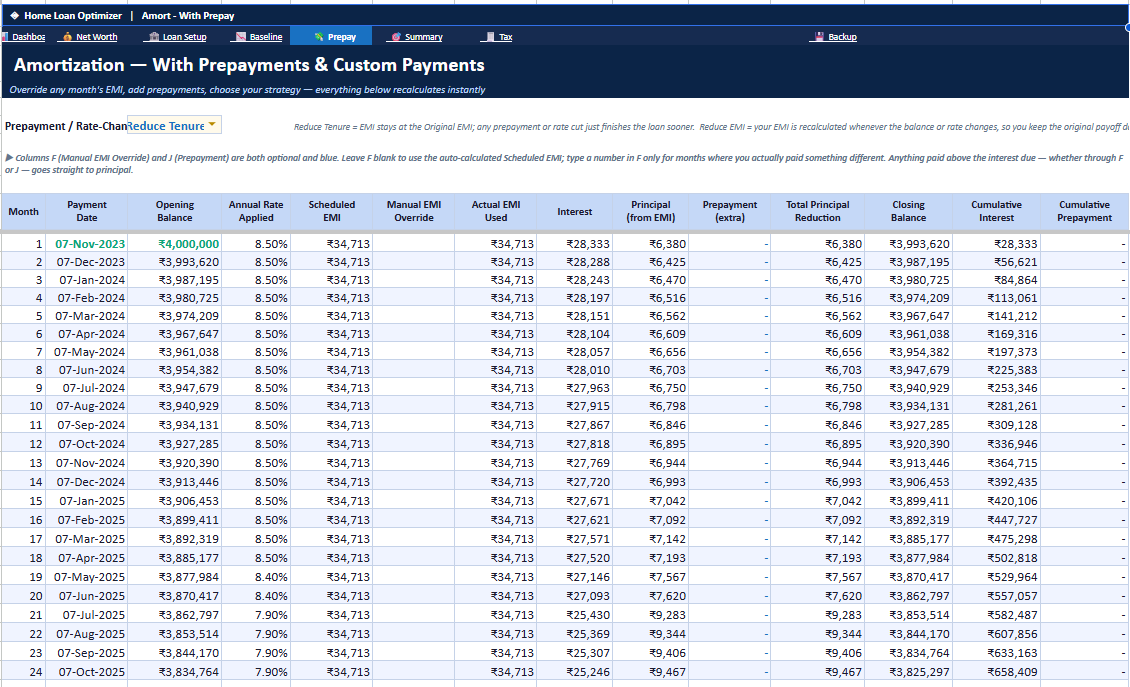
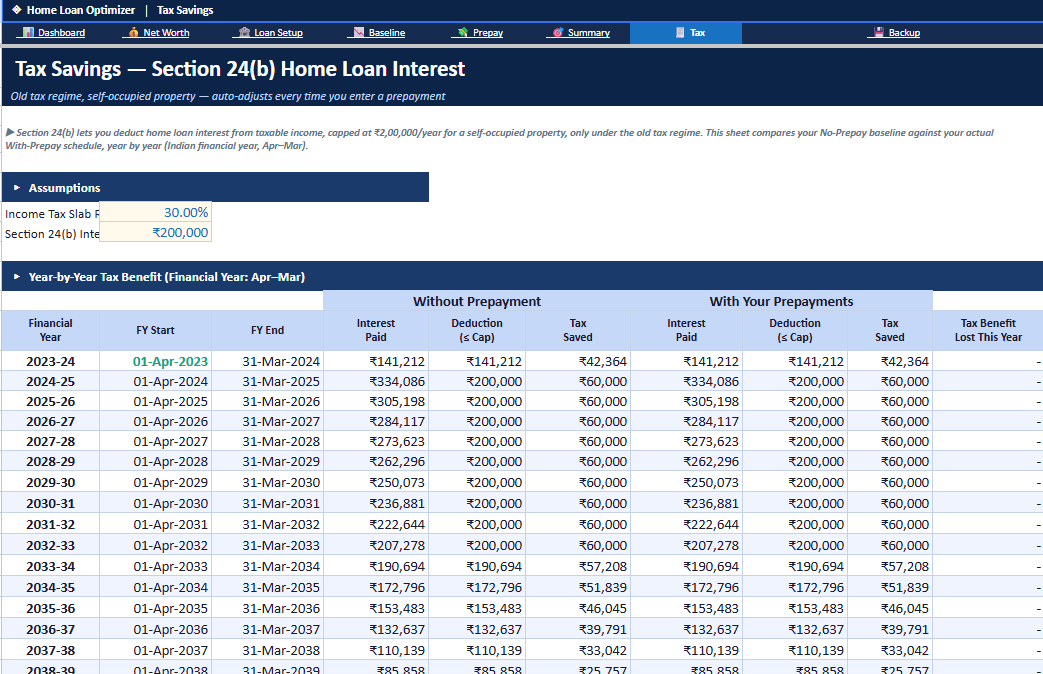
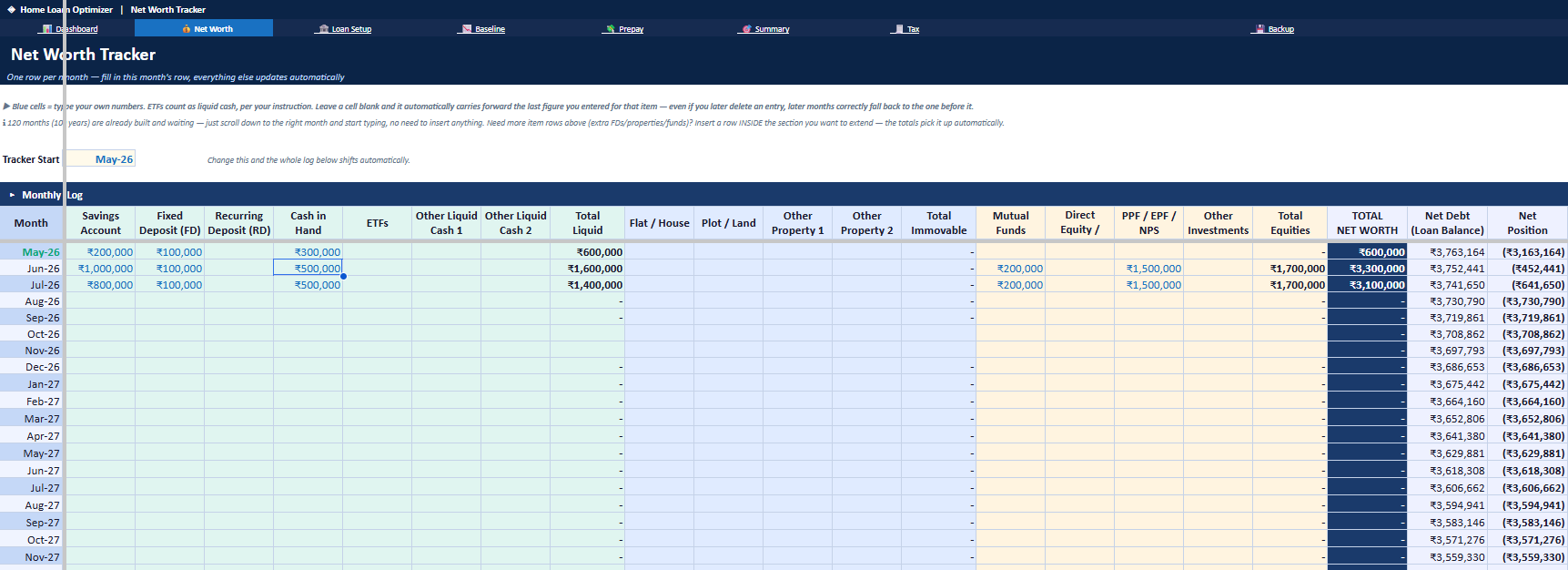
Four interconnected sheets. Change one number — everything updates across the file.
↓ Ready to get the full version? Try it live →
See if prepaying helps you.
Enter your loan details. Get your personal savings estimate instantly.
Most assume their loan is "probably fine." Add your own numbers below and see for sure.
What the free calculator shows — and what each tier adds.
| Feature | Free Calc | Lite ₹199 | Pro ₹349 | 360 ₹549 |
|---|---|---|---|---|
| Interest saved estimate | ✓ | ✓ | ✓ | ✓ |
| Full 30-year amortization file | — | ✓ | ✓ | ✓ |
| Live Dashboard + trend charts | — | — | ✓ | ✓ |
| Section 24(b) FY-wise safe limit | — | — | ✓ | ✓ |
| Net Worth Tracker — 10 years | — | — | — | ✓ |
| Data stays offline, private | ✓ | ✓ | ✓ | ✓ |
Every sheet. Every feature. Nothing hidden.
PrepayPlanner is built as 10 interconnected sheets. Each one answers a specific question your bank never told you to ask.
Live Dashboard
Both tiers get a live dashboard that updates the moment you change any number — but how much it shows differs by tier.
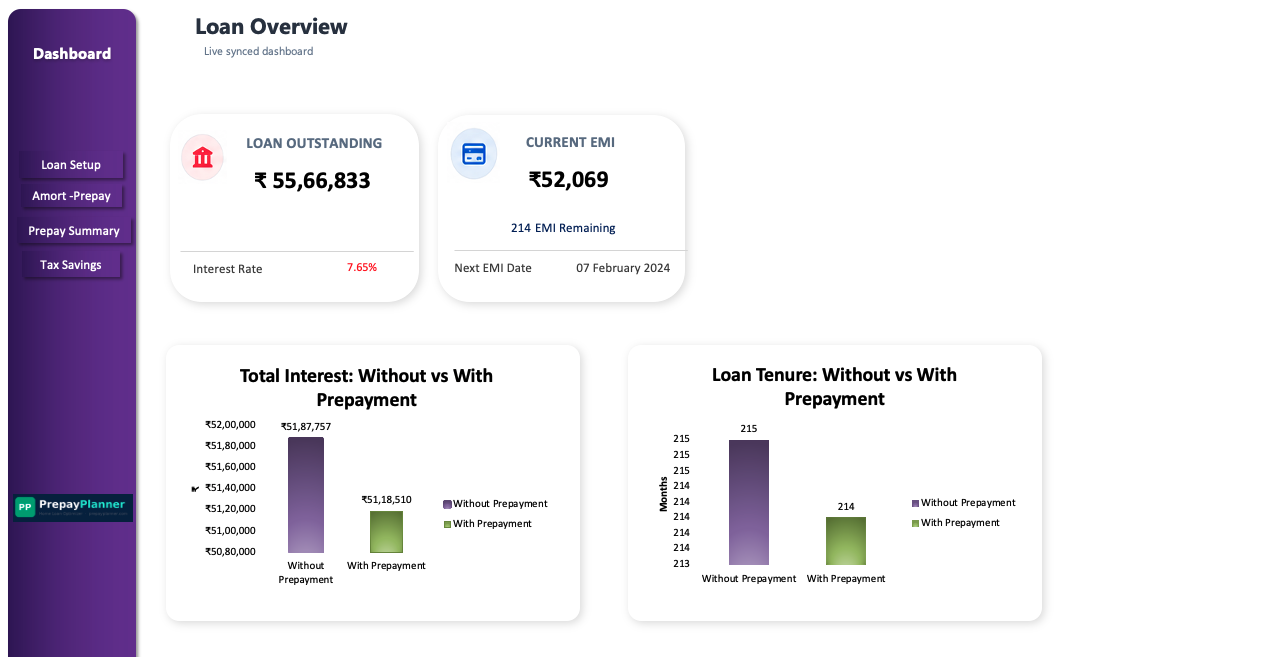
- Pro: Loan Outstanding + Current EMI, plus loan balance trend & prepayment comparison charts
- 360: Everything in Pro, plus Net Worth Tracker — your whole financial picture, not just the loan
Home Loan Setup
Enter your loan once. Indian Bank rate change history is pre-loaded — just verify and update if your bank changed rates.
- Bank name, principal, tenure, start date
- Rate history table (Indian Bank pre-filled)
- Auto-calculates current EMI and balance
Baseline Amortization
360 months of what happens with zero prepayment. This is your comparison baseline — every saving is measured against this.
- Full 30-year month-by-month schedule
- Opening balance, interest, principal, closing
- Rate changes applied month by month
- Total interest across full loan life
Amortization With Prepayments
Enter any prepayment in any month. Toggle between Reduce Tenure or Reduce EMI. Interest saved and years cut update live.
- Month-by-month prepayment entry column
- Reduce Tenure vs Reduce EMI toggle
- Closing balance recalculates per row
- Side-by-side vs baseline comparison
Prepayment Summary & What-If
The decision sheet. Tells you total interest saved, months cut, and what EMI or timeline you need to hit a goal.
- Total prepayment entered + interest saved
- What-If A: I want to finish in X years → required EMI
- What-If B: I want to pay ₹X EMI → resulting tenure
- 360 only: Liquidity-based recommendation (uses Net Worth data)
- Lifetime return on prepayment vs alternatives
Tax Savings — Section 24(b)
Financial year by year table showing exactly how prepayment affects your tax deduction — and the safe maximum before you lose the benefit.
- Toggle: Old vs New Tax Regime ← New
- FY-wise interest paid and deduction allowed
- Tax saved at 30% slab, per year
- Safe prepayment limit to keep full ₹60K/yr
- TRUE NET BENEFIT = Interest Saved − Tax Lost
Net Worth Tracker
Log your assets month by month. 120 months (10 years) pre-built. One row per month — Dashboard shows the complete financial picture.
- Savings Account, FD, Recurring Deposit
- ETFs, Mutual Funds, Stocks
- Property value, Car, Other assets
- Total Assets − Loan = Net Position
- Feeds liquidity recommendation in Prepay Summary
Data Backup & Restore
Export all your entries in two columns. When a new version releases, paste them back — your full history reappears instantly.
- Single-click export to two-column format
- Paste into any future version's Import sheet
- No data loss across version upgrades
- Works independently of other sheets
Deep Dive — Sheet by Sheet
Prepayment Summary
The single most important sheet for making the prepayment decision. It pulls data from every other sheet and gives you the complete picture in one place.
- Outstanding balance today + current rate + current EMI — pulled live from your Amort sheet
- Total interest saved across the life of your loan vs baseline
- Months and years cut from your remaining tenure
- Effective lifetime return on prepayment (so you can compare to FD/SIP returns)
- What-If A: Enter your desired closure year — see the EMI required
- What-If B: Enter your desired EMI — see how many years that saves
- Liquidity-based recommendation: after reserving 6-month emergency buffer, how much can you safely prepay?
Loan Snapshot
The Bottom Line
Compare 8.5% guaranteed (prepayment) vs 7–12% uncertain (equity) — your call is now informed, not a guess.
Tax Savings — Section 24(b)
The most underestimated part of home loan planning. Prepaying aggressively can push your annual interest below ₹2L — meaning you lose the tax deduction. This sheet tells you exactly when that happens and how much it costs.
- Toggle: Old Tax Regime (Yes) or New Regime (No) — set once in Home Loan Setup
- FY-wise table: interest paid each financial year
- Section 24(b) deduction allowed each year (capped at ₹2L)
- Tax saved per FY at 30% slab — ₹60,000 maximum annually
- Cumulative lifetime tax saving vs baseline
- Safe prepayment limit: the exact amount you can prepay this FY without losing the full ₹60K benefit
- TRUE NET BENEFIT: Interest Saved minus Tax Benefit Lost — the real number
FY-wise Tax Table
| Financial Year | Interest Paid | Tax Saved |
|---|---|---|
| FY 2023-24 | ₹4,18,234 | ₹60,000 |
| FY 2024-25 | ₹3,96,123 | ₹60,000 |
| FY 2025-26 | ₹3,72,418 | ₹60,000 |
| FY 2026-27 | ₹3,46,891 | ₹60,000 |
| ⋯ 20-year FY-by-FY breakdown | ||
Safe prepayment limit this FY: ₹2,14,082
Prepay more than this and you start losing part of your tax benefit (up to ₹60K/yr at 30% slab)
Net Worth Tracker — 10 Years
The long view. Track every asset category month by month for 10 years. The Dashboard shows your total financial picture — loan is just one side of it.
- 120 months pre-built (Jan 2025 → Dec 2034)
- Asset categories: Savings Account, FD, RD, ETFs, Mutual Funds, Property, Car, Other
- One row per month — takes 2 minutes monthly to update
- Total Assets auto-summed per row
- Loan Balance auto-pulled from Amort sheet
- Net Position = Total Assets − Loan Balance, every month
- Liquidity data feeds Prepayment Summary's recommendation engine
Sample Month — Jan 2025
Net Position: ₹90,46,800
Data Backup & Restore
PrepayPlanner will release updated versions. When that happens, you shouldn't have to start from scratch. The Backup sheet solves this permanently.
- Export everything you've entered into exactly two columns (Key + Value)
- Copy those two columns and paste into the Import sheet of any new version
- All your loan parameters, prepayment history, and net worth entries restore automatically
- Works regardless of how different the new version looks
- Takes less than 60 seconds to migrate versions
Backup Format (simplified)
| Key | Value |
|---|---|
| LOAN_PRINCIPAL | 5000000 |
| LOAN_START | Nov-2023 |
| LOAN_TENURE | 20 |
| PREPAY_NOV23 | 500000 |
| NW_JAN25_FD | 1200000 |
| ⋯ all your data in 2 columns | |
New version released? Paste 2 columns. Done. No data lost.
Three minutes once. Two minutes a month.
No learning curve. If you can use Excel, you can use PrepayPlanner.
Set up your loan
Enter principal, tenure, start date. Your bank's rate history is already there. Takes 2 minutes.
Enter prepayments
Type any amount into any month's prepayment column. Interest saved and years cut update live.
Read the tax picture
Check the Tax sheet for the safe prepayment limit — so you never lose your Section 24(b) benefit accidentally (up to ₹60K/yr at 30% slab).
Track monthly
Update Net Worth each month — 2 minutes. Dashboard shows your complete financial picture automatically.
From one home loan borrower to another
Questions people ask before buying
My loan is from HDFC / SBI / ICICI — not Indian Bank. Will it work?
Yes. The Indian Bank rate history is pre-filled but you can edit the rate table to match any bank's rate reset dates and percentages. Works identically for any Indian home loan on the monthly reducing balance method.
My loan is ₹80L–₹1.5Cr (metro). Does it handle high-value loans?
Completely. No upper limit on principal. The file models all 30 years (360 months) to cover any loan size.
I use the new tax regime. Is the tax sheet still useful?
You can set the tax toggle to "No" in Home Loan Setup — the Tax Savings sheet will show ₹0 impact (correct, since new regime doesn't allow Section 24b deduction). The prepayment analysis, amortization, and net worth tracker work perfectly regardless.
Will my financial data go online or get shared anywhere?
Never. The file has no macros, no internet connections, and no data-sending code — it's a plain .xlsx with formulas only. Your loan amount, income, assets — everything stays on your laptop permanently.
What happens when PrepayPlanner releases a future update?
The Data Backup sheet exports everything you've entered into two columns. Paste them into the new version — all your history reappears instantly. You never start from scratch.
Does it work on Mac?
Works on Microsoft Excel for Mac (2016 onwards). Google Sheets has limited support and isn't recommended — use Microsoft Excel for full functionality.
I have a joint home loan with my spouse. Does the tax calculation change?
Each co-borrower can individually claim up to ₹2L in home loan interest tax deduction (Section 24(b)), provided both are co-owners. The file gives total interest per financial year — you and your CA split the deduction based on ownership ratio.